
Merge PDFs
Combine multiple PDFs into one document.
Merge — also called Combine — puts multiple PDFs into one document, in the order you arrange them. It is free and runs entirely in your browser. Use Organize afterwards if you need to reorder pages. It is not Mail Merge: that one fills a single form from a spreadsheet to produce many documents.
Combining several PDFs into one
Queue the files, put them in order, and take only the pages you want from each.
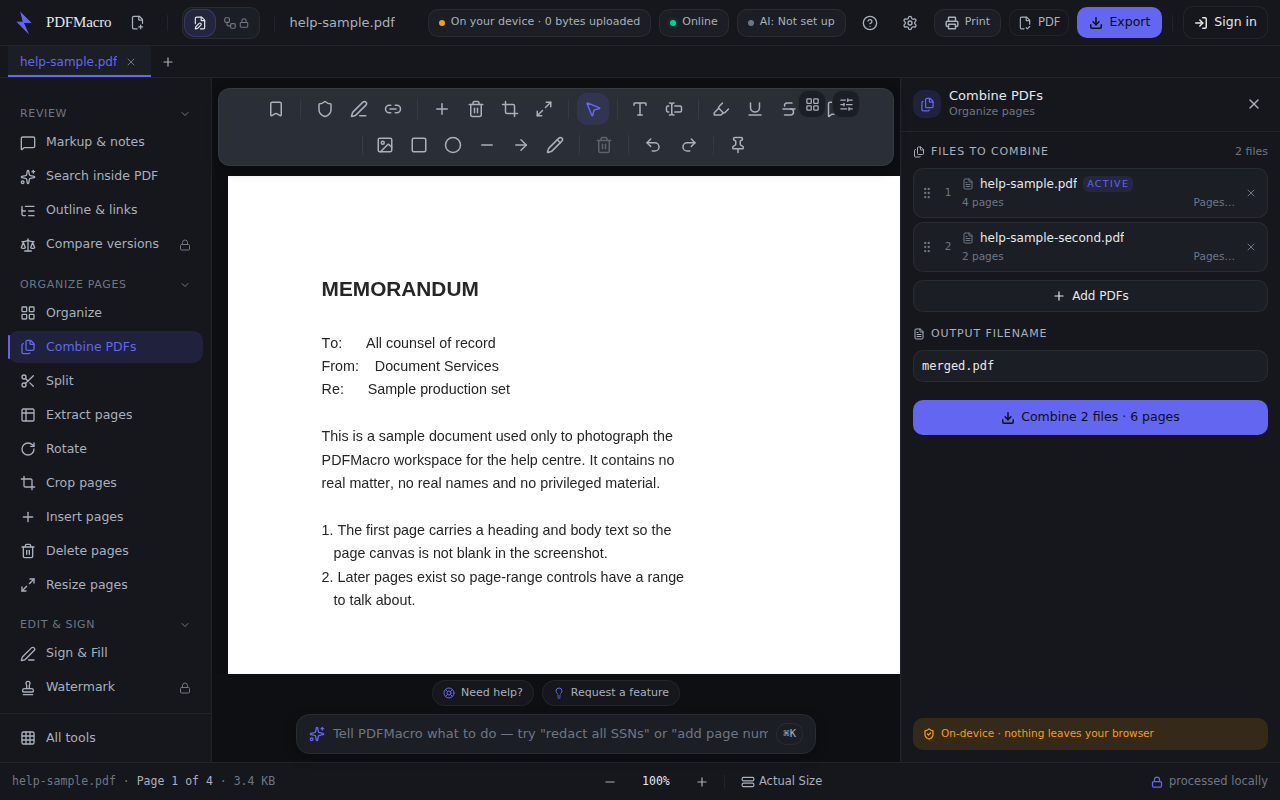
- 1Open one PDF, then add the restThe document you already have open seeds the list as the first row, badged “active”. “Add PDFs” opens a multi-select picker for the others. With nothing open the panel tells you to open one first.
- 2Drag the rows into the order you wantThe grip handle on the left of each row reorders it; the number beside it is that file's position in the output. The list is the order, top to bottom.
- 3Take only some pages from a file, if you want to“Pages…” on a row opens a range box that defaults to all — type something like 1-3 or 1,4,7-9. A range that parses but selects no pages BLOCKS the combine and names the file, rather than quietly dropping it from the output.
- 4Watch for the form-fields warningIf any file you queued has fillable form fields, a notice appears: combining copies pages, not the form tree, so the values stay visible but the merged PDF stops being fillable.
- 5Name the output and combineThe filename box defaults to merged.pdf. The button reads “Add at least 2 files” until there are two, then counts what it is about to write — files and total pages — so you can check the arithmetic before you press it.
Every step above was read out of the app's own source, and a test fails if the control it names is renamed. The picture is a real capture of the running workspace at 1280 × 800, signed in to nothing and holding no licence — but it is taken by hand, not on every build, so read it as the shape of the panel rather than proof of today's release.
Works offline. Once this page has loaded, the tool never contacts the network again.
Nothing leaves your device — the document is processed locally in this browser.
Typed into the workspace command bar, any of these opens this tool. They are the assistant's own routing examples, not a rewrite of them.
Also called: merge · merge pdf · merge pdfs · merge pdf files · combine · combine pdf · combine pdfs · combine pdf files · combine files · join pdfs · append files · assemble documents