
Redact a PDF
Marks and burns redactions into an exported copy with verification.
Redact for production lets you mark sensitive areas, review matches, then export a verified redacted PDF. The original source bytes stay read-only; the final burn happens only during export.
Marking a redaction and burning it in
From an unmarked page to an exported file that has been re-read to prove the text is gone.
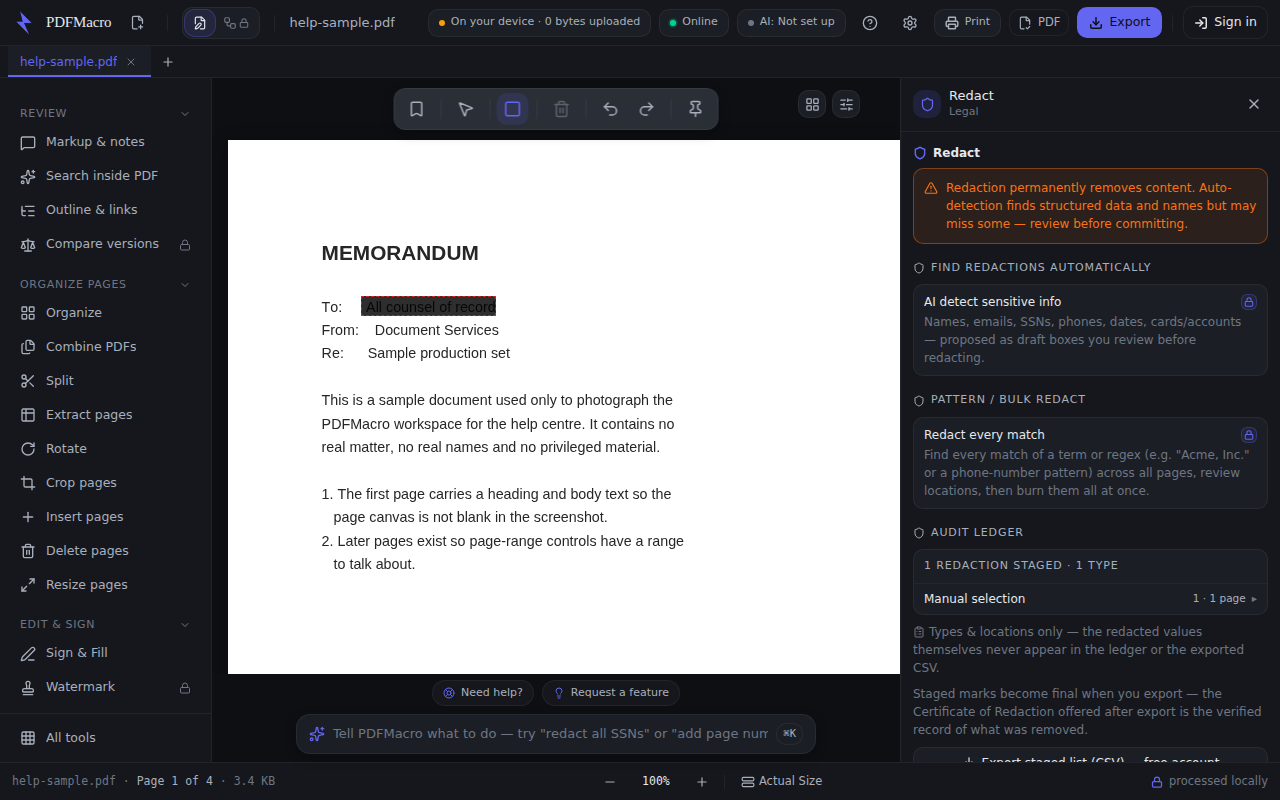
- 1Open the document first, then choose RedactThe panel will not let you mark anything without a document — it says so instead of showing controls that cannot work.
- 2Choosing Redact arms the drawing tool for youYou do not have to find it on the canvas toolbar. Selecting Redact in the rail switches the page tool to the redaction box, and the hint line under the toolbar reads “Drag to mark text or regions for permanent redaction on export.”
- 3Drag a box over the text or the regionEach box is a staged mark, not a change to the file yet. Nothing is removed until you export.
- 4Check the audit ledgerEvery mark appears in the ledger by page and region. The ledger records types and locations only — the redacted values themselves are never written into it or into the CSV it can export.
- 5Pick the redaction mode“Maximum security (recommended)” flattens every redacted page to an image, so the text is unrecoverable whatever the font or encoding — those pages stop being selectable. “Standard — keep text selectable” tries to delete only the redacted text from the content stream, and any page where the text — or a picture, such as a scan — still lies under a mark after verification is flattened anyway as a safety net.
- 6Tick the sign-off, then exportThe Export button stays disabled until you confirm you have reviewed every page — auto-detection flags structured patterns and cannot be relied on for names and context. On export the file is written and then re-parsed to confirm no extractable text remains.
Every step above was read out of the app's own source, and a test fails if the control it names is renamed. The picture is a real capture of the running workspace at 1280 × 800, signed in to nothing and holding no licence — but it is taken by hand, not on every build, so read it as the shape of the panel rather than proof of today's release.
Works offline. Once this page has loaded, the tool never contacts the network again.
Nothing leaves your device — the document is processed locally in this browser.
This tool changes or removes content. It writes a new copy — the file you opened on disk is never modified — but check the result before you rely on it.
Typed into the workspace command bar, any of these opens this tool. They are the assistant's own routing examples, not a rewrite of them.
Also called: redact · redaction · black out · burn redactions · remove sensitive text · verifiable redaction