
Split a PDF
Breaks a PDF into smaller files; manual split modes are free and smart split is Pro.
Split breaks a PDF into separate outputs. Free modes include splitting by page ranges or every N pages; smart/AI-assisted splitting is a Pro capability inside the Split tool.
Smart split is Pro, but the Split panel also includes free manual modes.
- Page ranges
- Every N pages
- Manual split points
Splitting one PDF into several
Five ways to cut a document up, and the two questions that only appear when they matter.
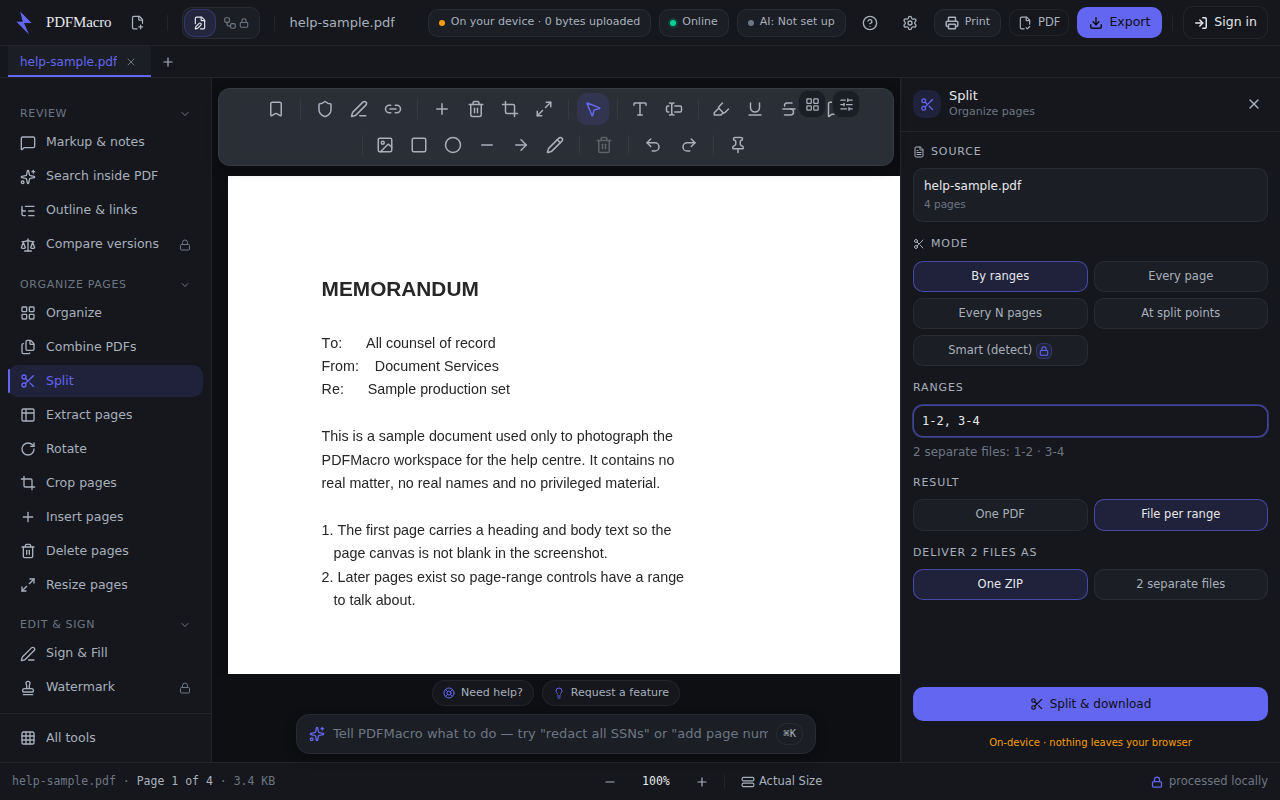
- 1Open the document and choose SplitThe Source card shows the filename and the page count it read. Without a document the panel says to open one.
- 2Pick a mode“By ranges” picks pages out. “Every page” makes one file per page. “Every N pages” cuts fixed chunks. “At split points” cuts the document into consecutive parts and keeps every page. “Smart (detect)” carries a padlock — it is the licensed Smart Document Splitter.
- 3Type the rangesThe box starts filled with the whole document. Type something like 1-3, 5, 8-10. The line underneath is a live count of what those ranges produce, and an unparseable range says so there instead of failing at the download.
- 4Choose one PDF or a file per rangeThis choice only appears when the ranges make more than one file, because until then there is nothing to choose. “One PDF” merges the selection into a single document; “File per range” keeps them apart.
- 5Choose how several files arriveAlso only offered when there is more than one output: one ZIP, or the files separately. Separately means your browser will ask permission to download several at once, and downloads are paced so none go missing.
- 6Split and downloadThe split runs in the browser and the parts are written straight to your device.
Every step above was read out of the app's own source, and a test fails if the control it names is renamed. The picture is a real capture of the running workspace at 1280 × 800, signed in to nothing and holding no licence — but it is taken by hand, not on every build, so read it as the shape of the panel rather than proof of today's release.
Works offline. Once this page has loaded, the tool never contacts the network again.
Nothing leaves your device — the document is processed locally in this browser.
Typed into the workspace command bar, any of these opens this tool. They are the assistant's own routing examples, not a rewrite of them.
Also called: split pdf · separate pages · break apart · divide document